IDEA Servlet 模板设置的方法
IDEA Servlet 模板
1. 打开模板设置
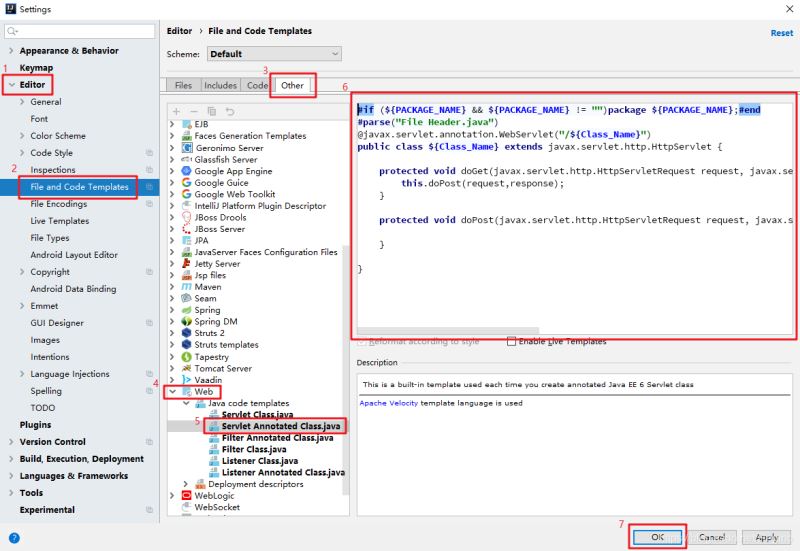
2. 替换模板内容
#if (${PACKAGE_NAME} && ${PACKAGE_NAME} != '')package ${PACKAGE_NAME};#end#parse('File Header.java')@javax.servlet.annotation.WebServlet('/${Class_Name}')public class ${Class_Name} extends javax.servlet.http.HttpServlet { protected void doGet(javax.servlet.http.HttpServletRequest request, javax.servlet.http.HttpServletResponse response) throws javax.servlet.ServletException, java.io.IOException { this.doPost(request,response); } protected void doPost(javax.servlet.http.HttpServletRequest request, javax.servlet.http.HttpServletResponse response) throws javax.servlet.ServletException, java.io.IOException { }}
3. 新建 Servlet
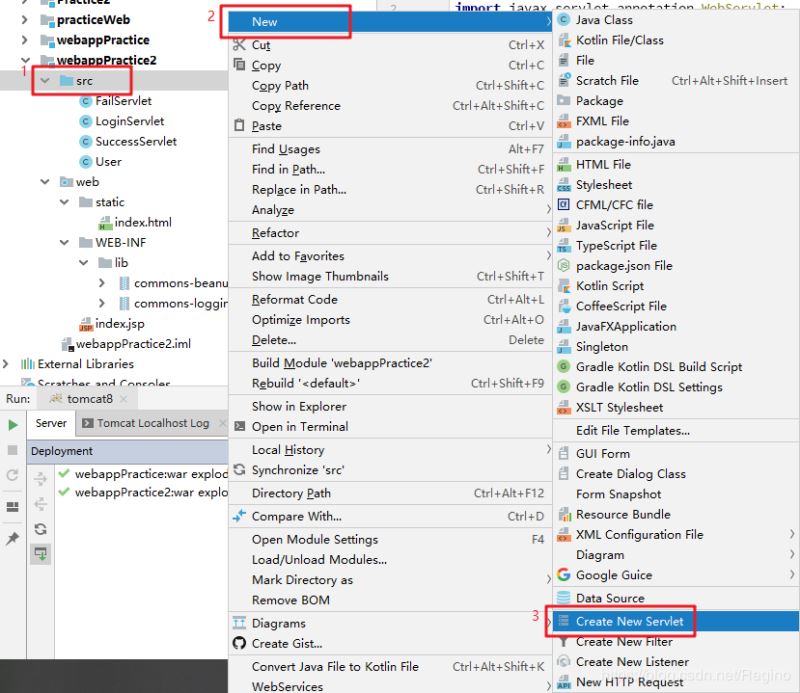
4. 效果输入类名即可自动创建 Servlet 文件:
import javax.servlet.ServletException;import javax.servlet.annotation.WebServlet;import javax.servlet.http.HttpServlet;import javax.servlet.http.HttpServletRequest;import javax.servlet.http.HttpServletResponse;import java.io.IOException;@WebServlet('/Servlet')public class Servlet extends HttpServlet { protected void doGet(HttpServletRequest request, HttpServletResponse response) throws ServletException, IOException { this.doPost(request, response); } protected void doPost(HttpServletRequest request, HttpServletResponse response) throws ServletException, IOException { }}
总结
到此这篇关于IDEA Servlet 模板设置的方法的文章就介绍到这了,更多相关IDEA Servlet 模板设置内容请搜索好吧啦网以前的文章或继续浏览下面的相关文章希望大家以后多多支持好吧啦网!
相关文章:
 网公网安备
网公网安备