js实现模拟购物商城案例
学习HTML,css和js前端的小伙伴们,这次来分享购物商城案例的实现!
准备阶段:准备一些需要放到页面上的图片,小图和其对应的大图,博主这边举例为小图(40 x 40),大图(321 x 430)。
结构分析: 大图区域 小图区域 整体边框区域 效果分析: 鼠标放在小图片上大图会对应显示。 鼠标放在小图片上面会有对应效果。 鼠标移出时小边框对应效果消失。 使用css对边框进行设置:对div标签进行设置(对边框属性进行设置):
#showdiv{ width: 342px; height: 505px; border: solid 1px ; border-radius: 10px; }
对table标签进行设置(不需要边框,且离顶部有一定的距离):
#ta{ margin: auto; margin-top: 5px; }使用js对页面动态效果进行设置:
鼠标进入的函数:
function operInImg(img,src){ //设置图片的样式 img.style.border='solid 1px blue'; //设置大图的img路径 //获取大图路径 var big = document.getElementById('big'); //设置路径 big.src=src; } function operOutImg(img){ //设置图片的样式 img.style.border=''; }
鼠标移出函数:
function operOutImg(img){ //设置图片的样式 img.style.border=''; }整体代码实现:
<!DOCTYPE html><html lang='en'><head> <meta charset='UTF-8'> <meta http-equiv='X-UA-Compatible' content='IE=edge'> <meta name='viewport' content='width=device-width, initial-scale=1.0'> <!--声明js代码域--> <script>//创建函数进行照片的联动和样式设置function operInImg(img,src){ //设置图片的样式 img.style.border='solid 1px blue'; //设置大图的img路径//获取大图路径var big = document.getElementById('big');//设置路径big.src=src; }function operOutImg(img){ //设置图片的样式 img.style.border='';} </script> <!---声明css代码域--> <style>/*设置div样式*/#showdiv{ width: 342px; height: 505px; border: solid 1px ; border-radius: 10px;}/*设置table样式*/#ta{ margin: auto; margin-top: 5px;} </style> <title>taobao</title></head><body> <div id='showdiv'> <table id='ta'> <tr height='300px'> <td colspan='5'><img src='https://www.haobala.com/bcjs/images/demo-big.jpg' alt='' id='big'></td> </tr> <tr height='40px'> <td><img src='https://www.haobala.com/bcjs/images/demo01.jpg' alt='' onmouseover='operInImg(this,’./images/demo-big01.jpg’)' onmouseout='operOutImg(this)'></td> <td><img src='https://www.haobala.com/bcjs/images/demo02.jpg' alt='' onmouseover='operInImg(this,’./images/demo-big02.jpg’)' onmouseout='operOutImg(this)'> </td> <td><img src='https://www.haobala.com/bcjs/images/demo03.jpg' alt='' onmouseover='operInImg(this,’./images/demo-big03.jpg’)' onmouseout='operOutImg(this)'> </td> <td><img src='https://www.haobala.com/bcjs/images/demo04.jpg' alt='' onmouseover='operInImg(this,’./images/demo-big04.jpg’)' onmouseout='operOutImg(this)'> </td> <td><img src='https://www.haobala.com/bcjs/images/demo05.jpg' alt='' onmouseover='operInImg(this,’./images/demo-big05.jpg’)' onmouseout='operOutImg(this)'> </td> </tr> </table> </div></body></html>
实现效果:
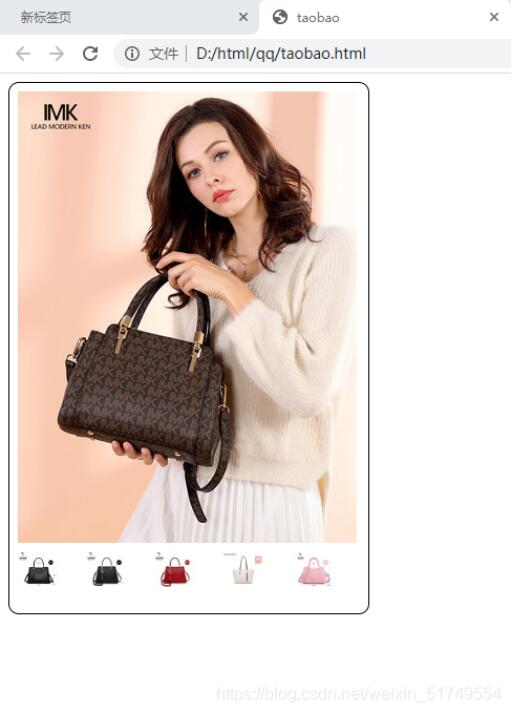
感谢您的阅读,不足之处欢迎指正!
以上就是本文的全部内容,希望对大家的学习有所帮助,也希望大家多多支持好吧啦网。
相关文章:
 网公网安备
网公网安备