原生java代码实现码云第三方验证登录的示例代码
研究了QQ,码云,微信等第三方登录接口时,发现QQ以及微信第一步都需要验证授权管理,而且个人测试需要提供手持身份证一张,并且验证时间过长( 3天工作日左右吧 ),这样会非常浪费大家学习第三方接口登录的时间,终于, 在我的不屑努力下,找到了适合大家快速上手,测试第三方接口登录的平台-————码云(看网上帖子说某WX接入还要开发者认证,人民币300元)码云链接地址https://gitee.com/
一、在码云上创建应用1、在码云上注册一个账号,点击右上角设置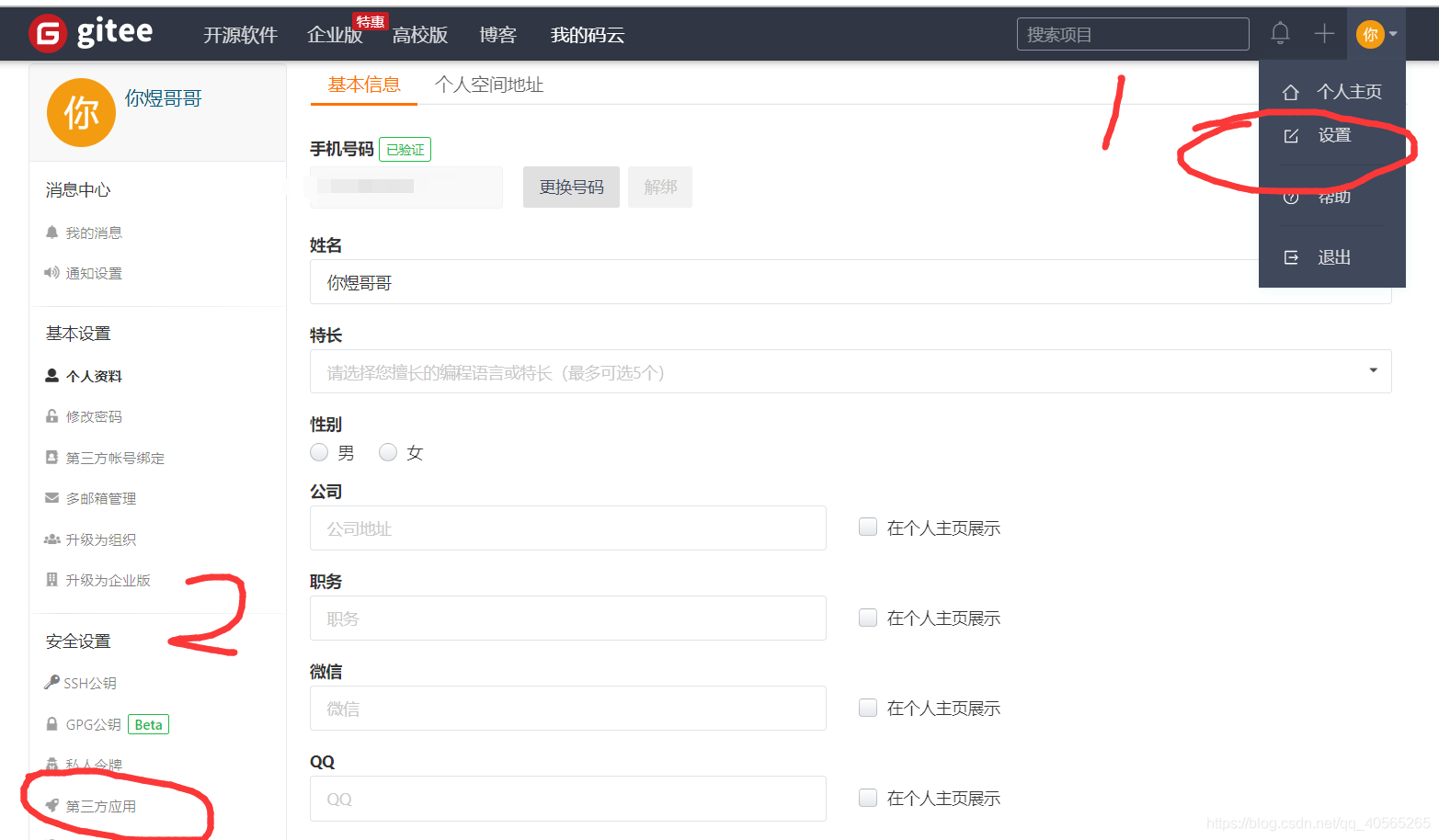
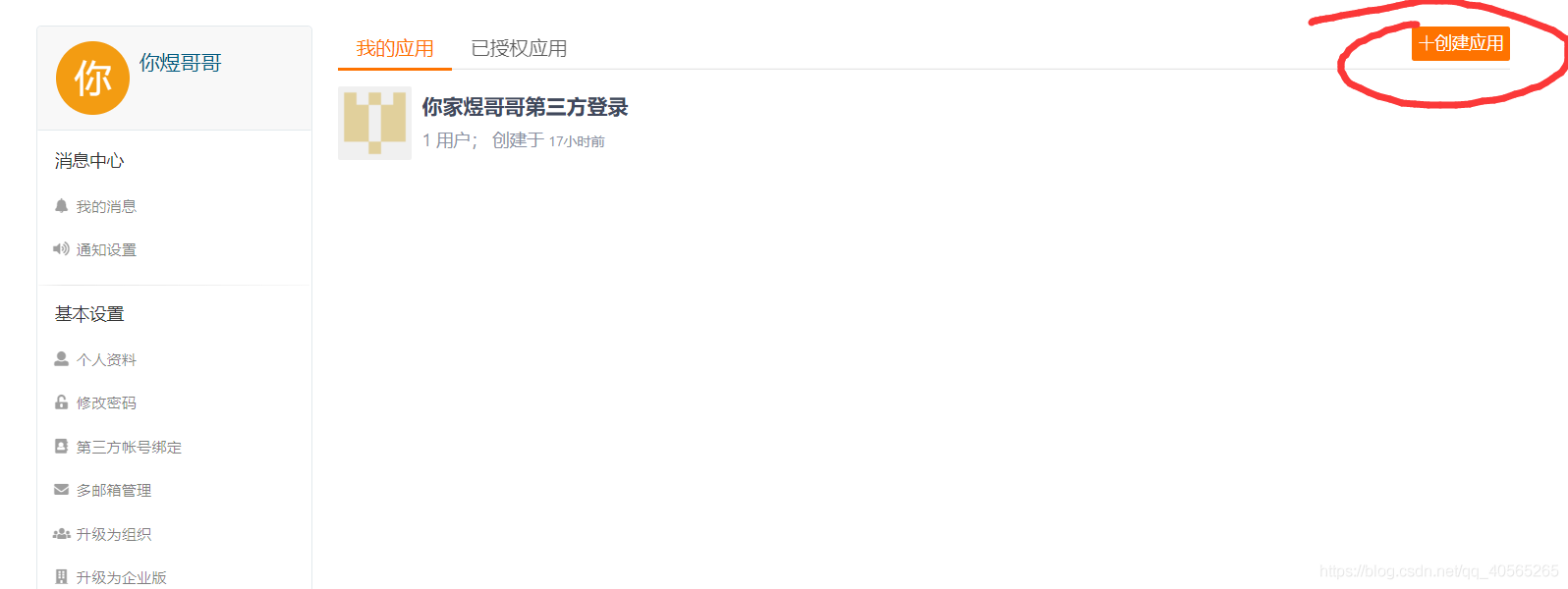
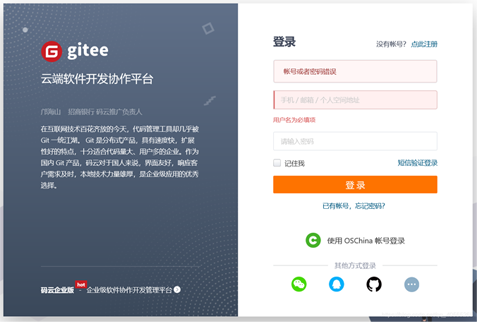
很多同学不太了解什么是应用回调地址webhooks(第三方登录成功后,会返回到你指定的地址,并且携带验证是否成功的参数信息)
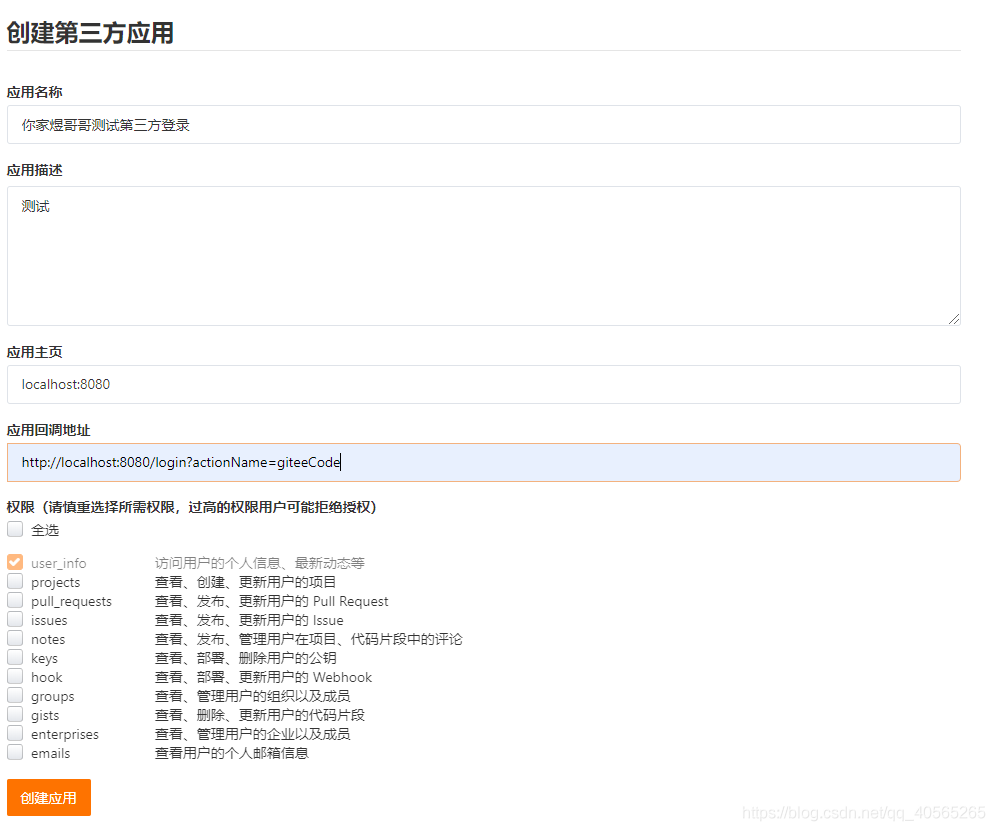
clientId和client Sercret的主要作用是通过拼接得到请求地址,将地址重定向至授权登录页面
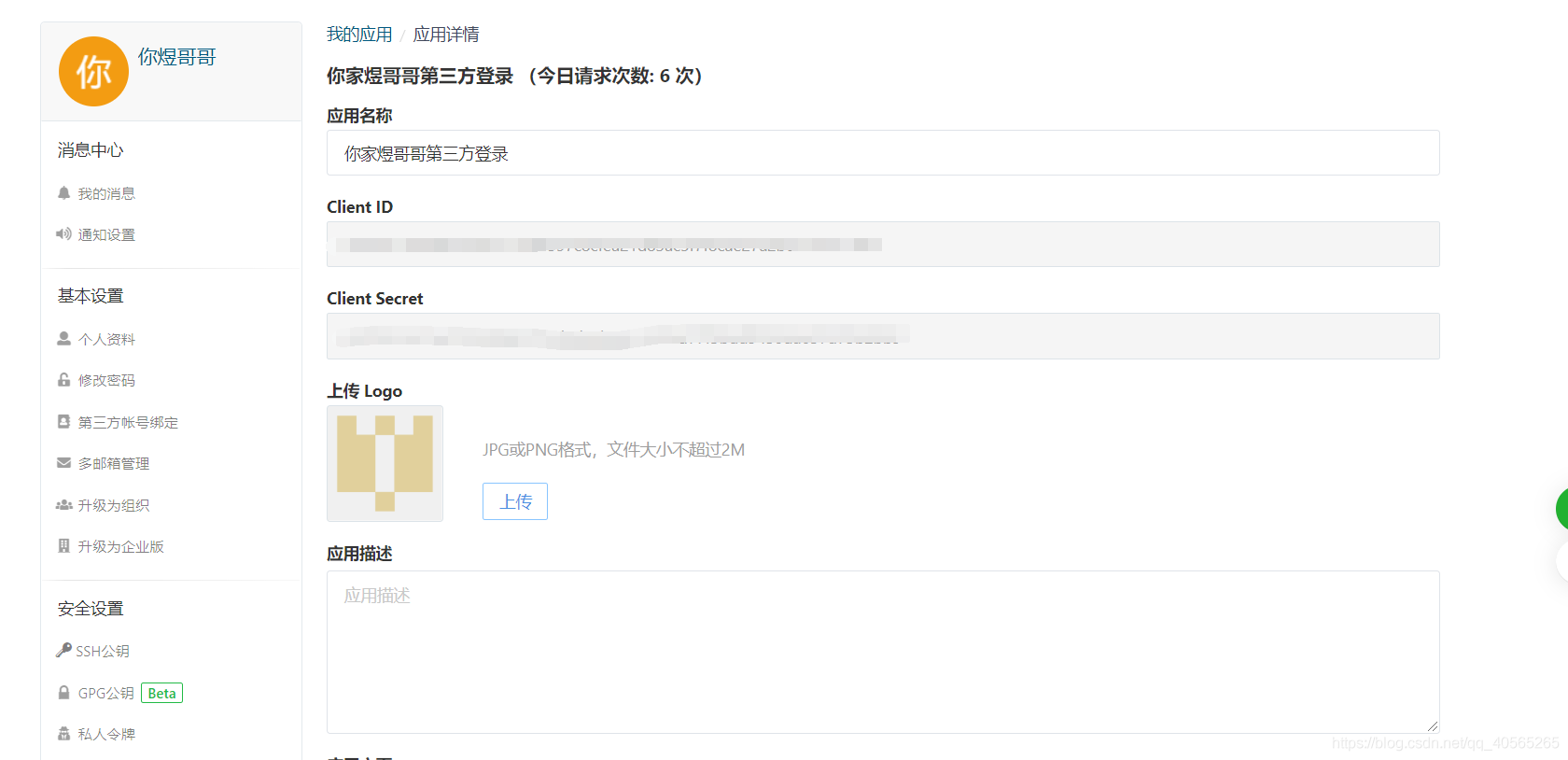
准备过程已完成
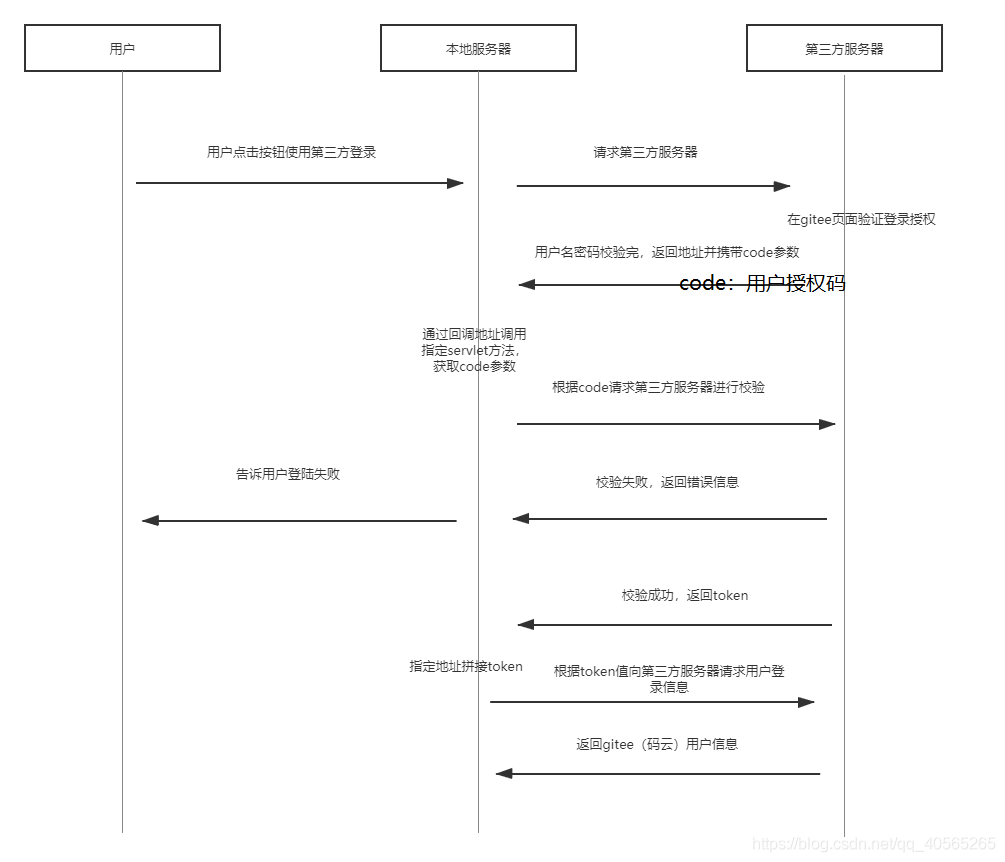
二、在项目中实现第三方登录大概流程
<!--servlet服务--><dependency> <groupId>javax.servlet</groupId> <artifactId>javax.servlet-api</artifactId> <version>3.1.0</version> </dependency><!--第三方登录插件包--> <dependency> <groupId>me.zhyd.oauth</groupId> <artifactId>JustAuth</artifactId> <version>1.3.2</version> </dependency><!--服务器发送get,post工具包--> <dependency> <groupId>org.apache.httpcomponents</groupId> <artifactId>httpclient</artifactId> <version>4.5.2</version> </dependency>2、跳转授权页面
AuthRequest authRequest = new AuthGiteeRequest(AuthConfig.builder().clientId(CLIENT_ID) //Client ID.clientSecret(CLIENT_SECRET) //Client Secret.redirectUri(REDIRECTURI) //回调地址.build());String authorizeUrl = authRequest.authorize(AuthStateUtils.createState());//跳转到授权页面response.sendRedirect(authorizeUrl);3、通过回调地址获取到code值
//http://localhost:8080/login?actionName=giteeCode&code=e063730161cd40cf&state=25c74eba2ac5f String code = request.getParameter('code');4、再将用户授权码发送码云服务器
补充一个小小的坑,码云第三方验证需要加上header信息,否则会报403错误
String url = 'https://gitee.com/oauth/token?grant_type=authorization_code&code='+code+'&client_id='+CLIENT_ID+'&redirect_uri='+REDIRECTURI+'&client_secret='+CLIENT_SECRET;Map<String,String> map = new HashMap<>();map.put('User-Agent','Mozilla/5.0 (Windows NT 10.0; Win64; x64) AppleWebKit/537.36 (KHTML, like Gecko) Chrome/58.0.3029.110 Safari/537.36)');JSONObject s = HttpUtils.post(url,map);
授权登录失败会返回message错误信息,标识登录失败
成功:
{'access_token':'e386e20327b7c4','refresh_token':'057c79c2d1f957a5cb4d','scope':'user_info','created_at':15488,'token_type':'bearer','expires_in':86400}5、获取码云用户信息
通过授权码获取到的json数据,其中access_token参数,可以访问码云的用户数据
//https://gitee.com/api/v5/user?access_token=*******String access_token = s.getString('access_token');String url2 = 'https://gitee.com/api/v5/user?access_token='+access_token;JSONObject user = HttpUtils.get(url2,map);//1、设置响应类型输出流response.setContentType('application/json;charset=UTF-8');//2、将json转为字符串String str = JSON.toJSONString(user);//3、得到字符输出流response.getWriter().write(str);
源码:在这小编要说一下回调地址操作1和回调地址操作2的区别操作1:小编使用的是服务器的get,post发送请求,而跳转“授权页面”(giteeLogin 方法)使用的是插件,各位看主大大也可手动改为get请求,跳转第三方登录页面,具体get地址请参考码云oauth文档其中A和B步骤,修改后就可以不用插件代码跳转授权页面
操作2:完全使用的是JustAuth插件实现第三方登录
import com.alibaba.fastjson.JSON;import com.alibaba.fastjson.JSONObject;import com.shsxt.utils.HttpUtils;import me.zhyd.oauth.config.AuthConfig;import me.zhyd.oauth.model.AuthCallback;import me.zhyd.oauth.model.AuthResponse;import me.zhyd.oauth.request.AuthGiteeRequest;import me.zhyd.oauth.request.AuthRequest;import me.zhyd.oauth.utils.AuthStateUtils;import org.apache.http.client.ClientProtocolException;import org.apache.http.client.methods.HttpPost;import org.apache.http.client.methods.HttpRequestBase;import org.apache.http.impl.client.CloseableHttpClient;import org.apache.http.impl.client.HttpClients;import org.apache.http.util.EntityUtils;import javax.servlet.ServletException;import javax.servlet.annotation.WebServlet;import javax.servlet.http.HttpServlet;import javax.servlet.http.HttpServletRequest;import javax.servlet.http.HttpServletResponse;import java.io.IOException;import java.io.UnsupportedEncodingException;import java.util.HashMap;import java.util.Map;@WebServlet('/login')public class LoginServlet extends HttpServlet { private static final long serialVersionUID = 1L; //ac85a173bb89ee private final String CLIENT_ID = “Client ID” private final String CLIENT_SECRET= “Client Secret” private final String REDIRECTURI = “回调地址” protected void service(HttpServletRequest request, HttpServletResponse response) throws ServletException, IOException {//获取用户行为String actionName = request.getParameter('actionName');//判断用户行为if('giteeLogin'.equals(actionName)) { //如果发送码云授权验证 giteeLogin(request,response);}else if('giteeCode'.equals(actionName)) { //giteeCode(request,response); giteeCode2(request,response);}System.out.println('点击了'); } /** * 回调地址后的操作1 * @param request * @param response */ private void giteeCode(HttpServletRequest request, HttpServletResponse response) throws IOException {//获取codeString code = request.getParameter('code');String url = 'https://gitee.com/oauth/token?grant_type=authorization_code&code='+code+'&client_id='+CLIENT_ID+'&redirect_uri='+REDIRECTURI+'&client_secret='+CLIENT_SECRET;Map<String,String> map = new HashMap<>();map.put('User-Agent','Mozilla/5.0 (Windows NT 10.0; Win64; x64) AppleWebKit/537.36 (KHTML, like Gecko) Chrome/58.0.3029.110 Safari/537.36)');JSONObject s = HttpUtils.post(url,map);System.out.println(s);//https://gitee.com/api/v5/user?access_token=*******String access_token = s.getString('access_token');String url2 = 'https://gitee.com/api/v5/user?access_token='+access_token;JSONObject user = HttpUtils.get(url2,map);//1、设置响应类型输出流response.setContentType('application/json;charset=UTF-8');//2、将json转为字符串String str = JSON.toJSONString(user);//3、得到字符输出流response.getWriter().write(str); } /** * 回调地址后的操作2 * @param request * @param response */ private void giteeCode2(HttpServletRequest request, HttpServletResponse response) throws IOException { String code = request.getParameter('code');AuthRequest authRequest = new AuthGiteeRequest(AuthConfig.builder().clientId(CLIENT_ID) //Client ID.clientSecret(CLIENT_SECRET) //Client Secret.redirectUri(REDIRECTURI) //回调地址.build());AuthResponse json = authRequest.login(code);System.out.println(json); } /** * 跳转授权页面 * @param request * @param response */ private void giteeLogin(HttpServletRequest request, HttpServletResponse response) throws IOException {//跳转授权页面AuthRequest authRequest = new AuthGiteeRequest(AuthConfig.builder().clientId(CLIENT_ID) //Client ID.clientSecret(CLIENT_SECRET) //Client Secret.redirectUri(REDIRECTURI) //回调地址.build());String authorizeUrl = authRequest.authorize();//跳转到授权页面response.sendRedirect(authorizeUrl); }}
服务器发送get/post请求工具类
package com.shsxt.utils;import com.alibaba.fastjson.JSON;import com.alibaba.fastjson.JSONObject;import org.apache.http.client.ClientProtocolException;import org.apache.http.client.methods.HttpGet;import org.apache.http.client.methods.HttpPost;import org.apache.http.client.methods.HttpRequestBase;import org.apache.http.impl.client.CloseableHttpClient;import org.apache.http.impl.client.HttpClients;import org.apache.http.util.EntityUtils;import java.io.IOException;import java.io.UnsupportedEncodingException;import java.util.Map;import java.util.Set;public class HttpUtils { /* *发送简单post请求 */ public static JSONObject post(String url) {HttpPost post = new HttpPost(url);return getResult(post); } /* *发送带Header的post请求 */ public static JSONObject post(String url, Map<String, String> map) {HttpPost post = new HttpPost(url);if (!map.isEmpty()) { Set<Map.Entry<String, String>> entrys = map.entrySet(); for (Map.Entry<String, String> entry : entrys) {post.setHeader(entry.getKey(), entry.getValue()); }}return getResult(post); } /* *发送带Header的get请求 */ public static JSONObject get(String url, Map<String, String> map) {HttpGet get = new HttpGet(url);if (!map.isEmpty()) { Set<Map.Entry<String, String>> entrys = map.entrySet(); for (Map.Entry<String, String> entry : entrys) {get.setHeader(entry.getKey(), entry.getValue()); }}return getResult(get); } /* *发送简单的get请求 */ public static JSONObject get(String url) {HttpGet get = new HttpGet(url);return getResult(get); } /* *发送请求方法,请求响应为JSONObject */ private static JSONObject getResult(HttpRequestBase requestBase) {CloseableHttpClient httpClient = HttpClients.createDefault();String result = null;try { result = EntityUtils.toString(httpClient.execute(requestBase).getEntity()); result = new String(result.getBytes('ISO-8859-1'),'utf-8'); httpClient.close();} catch (UnsupportedEncodingException e1) { e1.printStackTrace();} catch (ClientProtocolException e1) { e1.printStackTrace();} catch (IOException e1) { e1.printStackTrace();} finally { return new JSONObject(JSON.parseObject(result));} } /* *当请求响应为String时 */ public static String getString(String url) {CloseableHttpClient httpClient = HttpClients.createDefault();HttpGet get = new HttpGet(url);String result = null;try { result = EntityUtils.toString(httpClient.execute(get).getEntity()); httpClient.close();} catch (UnsupportedEncodingException e1) { e1.printStackTrace();} catch (ClientProtocolException e1) { e1.printStackTrace();} catch (IOException e1) { e1.printStackTrace();} finally { return result;} }}```*当请求响应为String时 */ public static String getString(String url) {CloseableHttpClient httpClient = HttpClients.createDefault();HttpGet get = new HttpGet(url);String result = null;try { result = EntityUtils.toString(httpClient.execute(get).getEntity()); httpClient.close();} catch (UnsupportedEncodingException e1) { e1.printStackTrace();} catch (ClientProtocolException e1) { e1.printStackTrace();} catch (IOException e1) { e1.printStackTrace();} finally { return result;} }}前端页面

到此这篇关于原生java代码实现码云第三方验证登录的示例代码的文章就介绍到这了,更多相关java码云第三方验证登录内容请搜索好吧啦网以前的文章或继续浏览下面的相关文章希望大家以后多多支持好吧啦网!
相关文章:
 网公网安备
网公网安备