关于linux redis安装及安装遇到的问题
redis官方传送门
Linux安装Redis服务步骤:
获取资源指定安装目录
[root@hadoop-master mnt]# mkdir reids [root@hadoop-master redis]# cd redis [root@hadoop-master redis]# wget http://download.redis.io/releases/redis-6.0.5.tar.gz [root@hadoop-master redis# tar xzf redis-6.0.5.tar.gz [root@hadoop-master redis]# cd redis-6.0.5 [root@hadoop-master redis-6.0.5]# make install PREFIX=/mnt/redis
可能会因为服务器中gcc版本的问题报错,如遇到报错就更新
make[1]: *** [server.o] 错误 1make[1]: 离开目录“/usr/redis-6.0.1/src”make: *** [all] 错误 2server.c:2402:11: 错误:‘struct redisServer’没有名为‘assert_file’的成员 server.assert_file = '<no file>'; ^server.c:2403:11: 错误:‘struct redisServer’没有名为‘assert_line’的成员 server.assert_line = 0; ^server.c:2404:11: 错误:‘struct redisServer’没有名为‘bug_report_start’的成员 server.bug_report_start = 0; ^server.c:2405:11: 错误:‘struct redisServer’没有名为‘watchdog_period’的成员 server.watchdog_period = 0; ^server.c:2411:11: 错误:‘struct redisServer’没有名为‘lua_always_replicate_commands’的成员 server.lua_always_replicate_commands = 1;
解决方案
[root@hadoop-master redis-6.0.5]# gcc -v # 查看gcc版本[root@hadoop-master redis-6.0.5]# yum -y install centos-release-scl # 升级到9.1版本[root@hadoop-master redis-6.0.5]# yum -y install devtoolset-9-gcc devtoolset-9-gcc-c++ devtoolset-9-binutils[root@hadoop-master redis-6.0.5]# scl enable devtoolset-9 bash以上为临时启用,如果要长期使用gcc 9.1的话:[root@hadoop-master redis-6.0.5]# echo 'source /opt/rh/devtoolset-9/enable' >>/etc/profile
再次执行
#指定安装的位置[root@hadoop-master redis-6.0.5]# make install PREFIX=/mnt/redis
成功提示
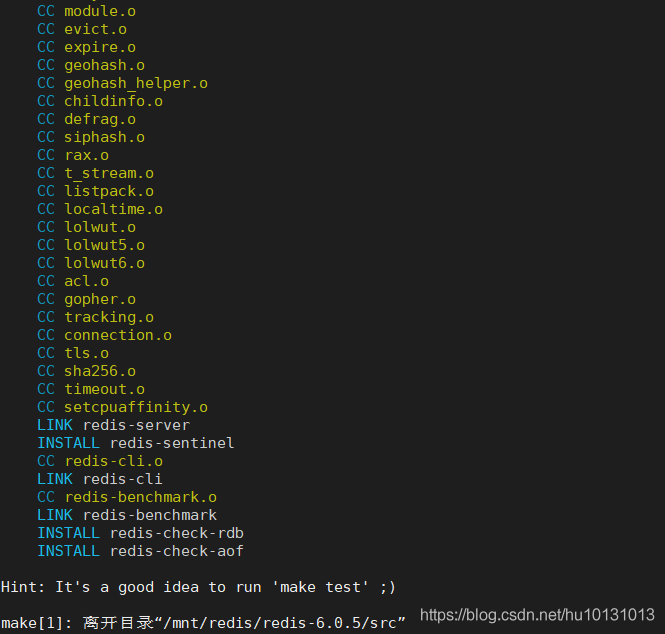
执行make test出错解决方案
[root@localhost redis-6.0.5]# yum install tcl[root@localhost redis-6.0.5]# make test
启动redis
[root@hadoop-master redis]# cd /mnt/redis/bin/ #指定配置文件[root@hadoop-master bin]# ./redis-server ../redis-6.0.5/redis.conf
可能遇到的遇到的警告提示
# 启动server出现的问题src/redis-server # warning 1 > 提示修改 linux内核参数# WARNING: The TCP backlog setting of 511 cannot be enforced because /proc/sys/net/core/somaxconn is set to the lower value of 128.echo 1024 >/proc/sys/net/core/somaxconn # warn 2 > 提示如下# WARNING overcommit_memory is set to 0! Background save may fail under low memory condition. To fix this issue add ’vm.overcommit_memory = 1’ to /etc/sysctl.conf and then reboot or run the command ’sysctl vm.overcommit_memory=1’ for this to take effect.echo 'vm.overcommit_memory = 1' >> /etc/sysctl.conf sysctl vm.overcommit_memory=1 # warning 3# WARNING you have Transparent Huge Pages (THP) support enabled in your kernel. This will create latency and memory usage issues with Redis. To fix this issue run the command ’echo never > /sys/kernel/mm/transparent_hugepage/enabled’ as root, and add it to your /etc/rc.local in order to retain the setting after a reboot. Redis must be restarted after THP is disabledecho never > /sys/kernel/mm/transparent_hugepage/enabled # 云服务器要注意ip要写对,端口要开放# 虚拟机要注意防火墙要关闭 systemctl stop firewalld.service
正常启动画面
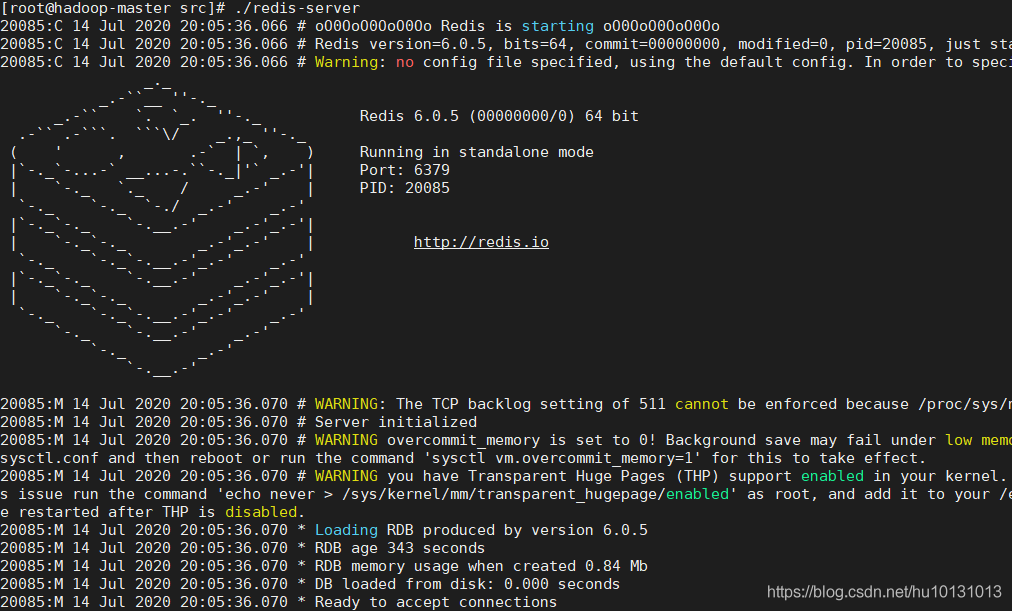
下面就可以尽情的去配置了。
到此这篇关于关于linux redis安装及安装遇到的问题的文章就介绍到这了,更多相关linux redis安装内容请搜索好吧啦网以前的文章或继续浏览下面的相关文章希望大家以后多多支持好吧啦网!
相关文章:
1. Win11任务栏卡死重启也没有用怎么办?解决Win11任务栏卡死问题2. Win10重装系统提示激活该如何操作?3. Win11 22H2 Buildx新版本KB5018496发布 更新内容一览4. Win11如何禁用资源管理器历史搜索?Win11禁用资源管理器历史搜索的方法5. 怎么通过电子邮件接收Win11的最新消息?通过邮件接收Win11消息的方法6. Win11如何将蓝牙设备连接PC?蓝牙设备连接PC方法教程7. 重装系统如何保留正版Win10和Office软件?8. 苹果 macOS 13 Ventura 开发者预览版 Beta 11今日推送9. 如何更改Win11中用户/组织名称? Win11修改组织名和用户名的技巧10. Fedora输入法切换快捷键怎么更改?
 网公网安备
网公网安备