解决Android studio 3.6.1 出现Cause: unable to find valid certification path to requested target 报错的问题
1、首先修改根目录下的build.gradle成如下格式
// Top-level build file where you can add configuration options common to all sub-projects/modules.buildscript { repositories { maven { url ’http://maven.aliyun.com/nexus/content/repositories/google’ } maven { url ’http://maven.aliyun.com/nexus/content/repositories/jcenter’} } dependencies { classpath ’com.android.tools.build:gradle:3.6.1’ // NOTE: Do not place your application dependencies here; they belong // in the individual module build.gradle files }}allprojects { repositories {// google()// jcenter() maven { url ’http://maven.aliyun.com/nexus/content/repositories/google’ } maven { url ’http://maven.aliyun.com/nexus/content/repositories/jcenter’} }}
2、然后点击sync project with gradle files,如下图所示
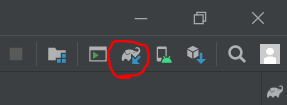
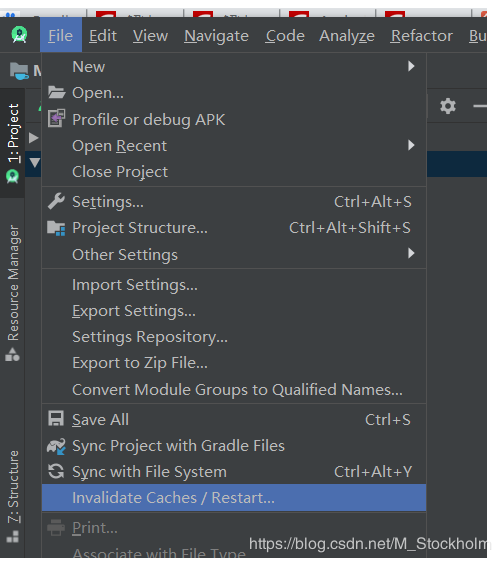
3、 如果再次报错请清理缓存并重启AS,方法如下图
4、(最重要的步骤)如果再次报错,请不厌其烦的且厚不要脸的多次点击这个小象(即重复第二步操作),正常情况下奇迹会发生的。(反正我是见证该奇迹了)
到此这篇关于解决Android studio 3.6.1 出现Cause: unable to find valid certification path to requested target 报错的问题的文章就介绍到这了,更多相关Android studio 3.6.1 报错内容请搜索好吧啦网以前的文章或继续浏览下面的相关文章希望大家以后多多支持好吧啦网!
相关文章:
1. python argparse模块通过后台传递参数实例2. 浅谈Python数学建模之固定费用问题3. Android Studio使用Kotlin时,修改代码后运行不生效的解决方法4. 如何使用浏览器扩展篡改网页中的JS 文件5. php使用fputcsv实现大数据的导出操作详解6. Android系统服务是如何获取的7. Springboot项目中运用vue+ElementUI+echarts前后端交互实现动态圆环图(推荐)8. vs code创建并运行python的方法9. Windows+Apache搭建PHP开发环境10. python读取配置文件方式(ini、yaml、xml)

 网公网安备
网公网安备