文章详情页
解决Android Studio电脑不支持HAXM的问题
浏览:206日期:2022-09-26 17:18:09
测试APP时出现以下错误信息:
Intel HAXM is required to run this AVD.
Your CPU does not support required features (VT-x or SVM).
Unfortunately, your computer does not support hardware accelerated virtualization.Here are some of your options: 1) Use a physical device for testing 2) Develop on a Windows/OSX computer with an Intel processor that supports VT-x and NX 3) Develop on a Linux computer that supports VT-x or SVM 4) Use an Android Virtual Device based on an ARM system image (This is 10x slower than hardware accelerated virtualization)
解决方案是使用基于ARM的系统映像。操作方法如图:
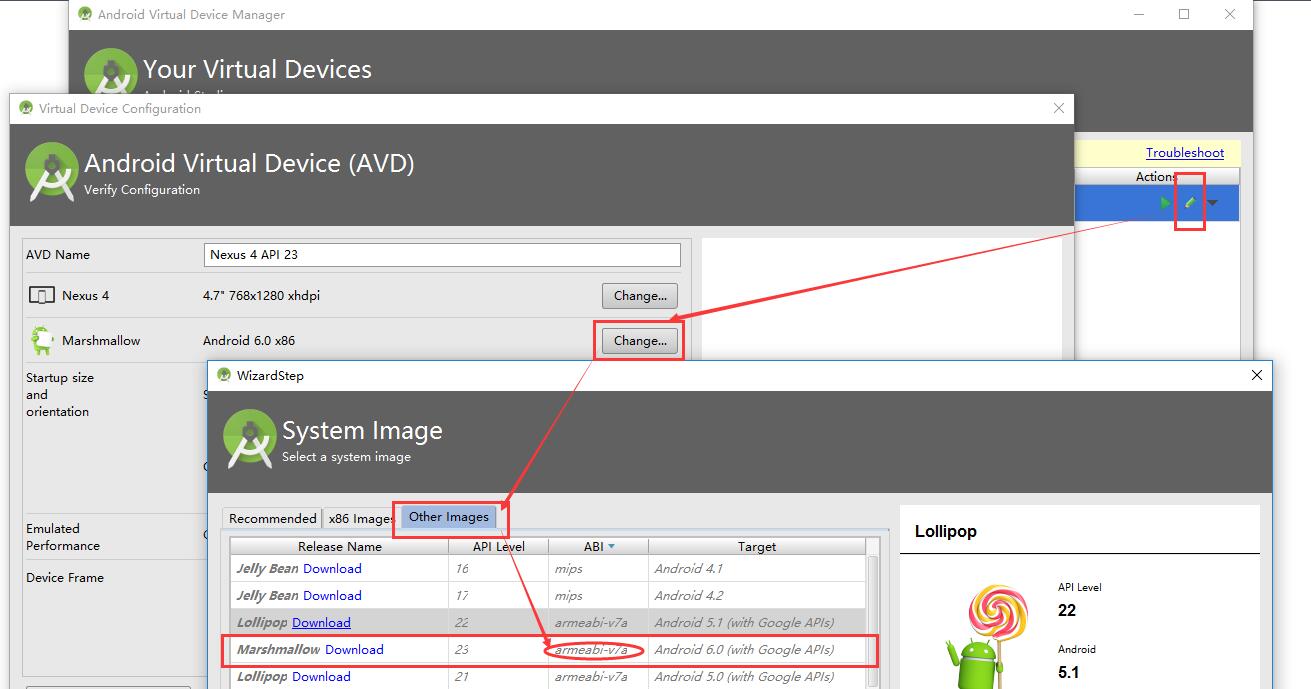
这样就没问题了。
总结
到此这篇关于解决Android Studio电脑不支持HAXM的问题的文章就介绍到这了,更多相关Android Studio电脑不支持HAXM内容请搜索好吧啦网以前的文章或继续浏览下面的相关文章希望大家以后多多支持好吧啦网!
标签:
Android
上一条:Android Studio 中运行 groovy 程序的方法图文详解下一条:Android Studio报错unable to access android sdk add-on list解决方案
相关文章:
1. vs code创建并运行python的方法2. Springboot集成jdbcTemplate过程解析3. php使用fputcsv实现大数据的导出操作详解4. vue实现简单图片上传5. python argparse模块通过后台传递参数实例6. Windows+Apache搭建PHP开发环境7. Android Studio使用Kotlin时,修改代码后运行不生效的解决方法8. 浅谈Python数学建模之固定费用问题9. Springboot项目中运用vue+ElementUI+echarts前后端交互实现动态圆环图(推荐)10. python读取配置文件方式(ini、yaml、xml)
排行榜

 网公网安备
网公网安备