前端 - gitbook serve命令提示找不到wensite.css和website.js
问题描述
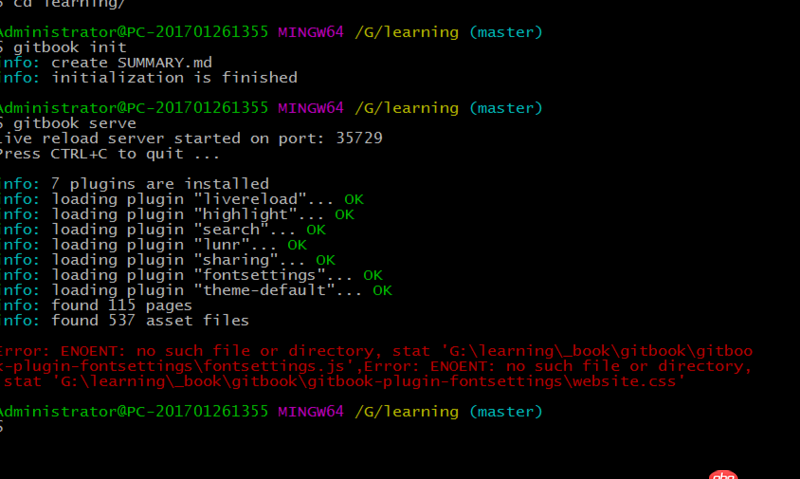
错误指示的目录下的文件是空的:

求大神解释一下
问题解答
回答1:gitbook fetch 2.6.7 gitbook -v 2.6.7 参考:https://www.v2ex.com/amp/t/34...我按照以上方法,发现还是不行,跟你出的问题一样。又仔细研究了下,发现把其他版本卸载了,只保留2.6.7的就可以了gitbook uninstall [version]
$ gitbook serve ./ --log=debug --debugLive reload server started on port: 35729Press CTRL+C to quit ...
debug: readme found at README.mddebug: summary file found at SUMMARY.mddebug: cleanup folder 'D:workspacegithubgitbook_book'info: 7 plugins are installedinfo: loading plugin 'livereload'... OKinfo: loading plugin 'highlight'... OKinfo: loading plugin 'search'... OKinfo: loading plugin 'lunr'... OKinfo: loading plugin 'sharing'... OKinfo: loading plugin 'fontsettings'... OKinfo: loading plugin 'theme-default'... OKinfo: found 4 pagesinfo: found 3 asset filesdebug: calling hook 'config'debug: calling hook 'init'debug: copy assets from theme C:Usersliuyun2.gitbookversions3.2.2node_modulesgitbook-plugin-theme-default_assetswebsitedebug: copy resources from plugin C:Usersliuyun2.gitbookversions3.2.2node_modulesgitbook-plugin-fontsettingsassets
Error: ENOENT: no such file or directory, stat ’D:workspacegithubgitbook_bookgitbookgitbook-plugin-fontsettingswebsite.css’,Error: ENOENT: no such file or directory, stat ’D:workspacegithubgitbook_bookgitbookgitbook-plugin-fontsettingsfontsettings.js’
$ gitbook currentGitBook version is 2.6.7
$ gitbook serve ./ --log=debug --debugLive reload server started on port: 35729Press CTRL+C to quit ...
debug: add block ’html’debug: add block ’code’info: loading book configuration....OKinfo: load plugin gitbook-plugin-highlight ....OKdebug: add block ’code’info: load plugin gitbook-plugin-search ....OKinfo: load plugin gitbook-plugin-sharing ....OKinfo: load plugin gitbook-plugin-fontsettings ....OKinfo: load plugin gitbook-plugin-livereload ....OKinfo: >> 5 plugins loadeddebug: normalize plugins listdebug: start parsing languages index: LANGS.mddebug: start parsing readme: README.mddebug: readme located at README.mddebug: start parsing summary: SUMMARY.mddebug: summary located at SUMMARY.mddebug: start parsing glossary: GLOSSARY.mdinfo: start generation with website generatorinfo: clean website generatordebug: remove D:workspacegithubgitbook_bookgitbookfonts (2/18)debug: remove D:workspacegithubgitbook_bookgitbookfontsfontawesome (3/18)debug: remove D:workspacegithubgitbook_bookgitbookfontsfontawesomeFontAwesome.otf (4/18)debug: remove D:workspacegithubgitbook_bookgitbookfontsfontawesomefontawesome-webfont.eot (5/18)debug: remove D:workspacegithubgitbook_bookgitbookfontsfontawesomefontawesome-webfont.svg (6/18)debug: remove D:workspacegithubgitbook_bookgitbookfontsfontawesomefontawesome-webfont.ttf (7/18)debug: remove D:workspacegithubgitbook_bookgitbookfontsfontawesomefontawesome-webfont.woff (8/18)debug: remove D:workspacegithubgitbook_bookgitbookfontsfontawesomefontawesome-webfont.woff2 (9/18)debug: remove D:workspacegithubgitbook_bookgitbookgitbook-plugin-fontsettings (10/18)debug: remove D:workspacegithubgitbook_bookgitbookgitbook-plugin-fontsettingsfontsettings.js (11/18)debug: remove D:workspacegithubgitbook_bookgitbookgitbook-plugin-fontsettingswebsite.css (12/18)debug: remove D:workspacegithubgitbook_bookgitbookgitbook.js (13/18)debug: remove D:workspacegithubgitbook_bookgitbookimages (14/18)debug: remove D:workspacegithubgitbook_bookgitbookimagesapple-touch-icon-precomposed-152.png (15/18)debug: remove D:workspacegithubgitbook_bookgitbookimagesfavicon.ico (16/18)debug: remove D:workspacegithubgitbook_bookgitbookstyle.css (17/18)debug: remove D:workspacegithubgitbook_bookgitbooktheme.js (18/18)info: OKdebug: call hook configdebug: transferring folder chapter1/debug: transferring folder end/debug: processing README.md 0%debug: start parsing file README.mddebug: render template README.mddebug: use file parser markdown for README.mddebug: call hook pagedebug: index page README.mddebug: write parsed file README.md to index.htmldebug: processing chapter1/README.md 25%debug: start parsing file chapter1/README.mddebug: render template chapter1/README.mddebug: use file parser markdown for chapter1/README.mddebug: call hook pagedebug: index page chapter1/README.mddebug: write parsed file chapter1/README.md to chapter1index.htmldebug: processing chapter1/section1.md 50%debug: start parsing file chapter1/section1.mddebug: render template chapter1/section1.mddebug: use file parser markdown for chapter1/section1.mddebug: call hook pagedebug: index page chapter1/section1.mddebug: write parsed file chapter1/section1.md to chapter1section1.htmldebug: processing end/README.md 75%debug: start parsing file end/README.mddebug: render template end/README.mddebug: use file parser markdown for end/README.mddebug: call hook pagedebug: index page end/README.mddebug: write parsed file end/README.md to endindex.htmldebug: call hook finishdebug: write search indexinfo: generation is finished
Starting server ...Serving book on http://localhost:4000
相关文章:
1. 老师的这种访问方式为什么我这里打不开呢2. 导入数据库不成功3. bindClass方法运行报错4. 请问“由于 Cookie “PHPSESSID”的“SameSite”属性设置为“None”,但缺少“Secure”属性,此 Cookie 未来将被拒绝。”请问出现这个问题怎么办?5. mysql索引 - mysql explain 的using where 到底是什么意思?6. Help!求帮助7. mysql - 如何在ubuntu 安裝環境?8. navicat - mysql select 查出全是null的一条?9. 使用mysql命令行连接远程数据库host跳转10. mysql - 给千万数据的表增加索引,不影响使用,怎么处理?
 网公网安备