微信小程序12行js代码自己写个滑块功能(推荐)
效果图如下所示
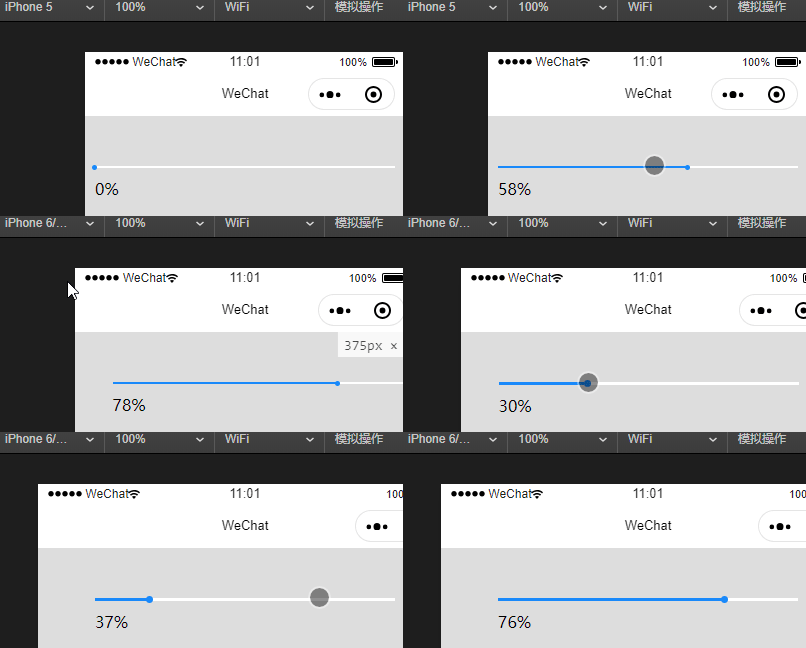
.wxml
<view bindtap='cuin'> <view style='width:{{towards}}px;'> <view bindtouchmove=’touchMove’></view> </view></view><view class='bfb'>{{percen}}%</view>
.wxss
page{ background-color:#ddd;}.jindu{ margin: 50px calc((100% - 300px) / 2) 0; width: 300px; float: left; height: 6rpx; background-color: #fff; position: relative;}.xian{ width: 0%; float: left; height: 6rpx; background-color: #1989FA; position: relative; transition: all 0.1s;}.yuan{ border-radius: 50%;background: #1989FA;position: absolute;right: 0rpx;display: block; margin: calc((6rpx - 14rpx)/2);width: 14rpx;height: 14rpx;}.bfb{ width: 300px; margin: 10px calc((100% - 300px) / 2) 0; float: left;}
.js
Page({ data: { towards: 0, percen:0, kuan:0, }, onLoad:function(options){ this.setData({ kuan: parseInt((wx.getSystemInfoSync().windowWidth - 300) / 2) }) }, cuin:function(e){ this.setData({ towards: (e.detail.x - this.data.kuan) > 300 ? 300 : (e.detail.x - this.data.kuan), percen: (e.detail.x / (300 / 100)) < 1 ? 0 : parseInt(e.detail.x / (300 / 100)), }) }, touchMove: function (e) { if (e.touches.length == 1) { var moveX = e.touches[0].clientX; var towards = (moveX - this.data.kuan) > 300 ? 300 : (moveX - this.data.kuan) this.data.percen = (towards / (300 / 100)) < 1 ? 0 : parseInt(towards / (300 / 100)) this.setData({ towards: towards, percen: this.data.percen }) } },})
到此这篇关于微信小程序12行js代码自己写个滑块功能的文章就介绍到这了,更多相关微信小程序滑块内容请搜索好吧啦网以前的文章或继续浏览下面的相关文章希望大家以后多多支持好吧啦网!
相关文章:

 网公网安备
网公网安备