Win10下使用PowerShelll让Cortana朗读小说的小技巧
有位win10用户向小编咨询,如何才能让Cortana朗读小说呢?Cortana是我们win10系统中的人工智能语音助手,它可以帮我们安排一些日常工作,也能和我们聊天解闷。其实在Cortana中确实是可以朗读小说的,只是很多的用户都不知道罢了。不知道也没有关系,小编今天就跟大家介绍一下如何使用PowerShelll让Cortana朗读小说,具体的操作请看下方的图文教程。
图1:Cortana
图2:微软小娜
方法步骤:1、首先将下面小编列出来的代码复制粘贴到.psl文件中保存好,没有可以创建一个。然后运行PowerShell,将.psl文件执行一次。
= 'HKLM:SOFTWAREMicrosoftSpeech_OneCoreVoicesTokensMSTTS_V110_zhCN_HongyuM'
= 'HKLM:SOFTWAREMicrosoftSpeech_OneCoreVoicesTokensMSTTS_V110_zhCN_HongyuMAttributes'
= 'HKLM:SOFTWAREMicrosoftSpeechVoicesTokensMSTTS_V110_zhCN_HongyuM'
= 'HKLM:SOFTWAREMicrosoftSpeechVoicesTokensMSTTS_V110_zhCN_HongyuMAttributes'
New-Item -Path ,,,
New-ItemProperty -Path , -Name '(default)' -PropertyType string -Value 'Microsoft Hongyu Mobile - Chinese (Simplified, PRC)'
New-ItemProperty -Path , -Name LangDataPath -PropertyType string -Value '%windir%Speech_OneCoreEnginesTTSzh-CNMSTTSLoczhCN.dat'
New-ItemProperty -Path , -Name LangUpdateDataDirectory -PropertyType string -Value '%SystemDrive%DataSharedDataSpeech_OneCoreEnginesTTSzh-CN'
New-ItemProperty -Path , -Name VoicePath -PropertyType string -Value '%windir%Speech_OneCoreEnginesTTSzh-CNM2052Hongyu'
New-ItemProperty -Path , -Name VoiceUpdateDataDirectory -PropertyType string -Value '%SystemDrive%DataSharedDataSpeech_OneCoreEnginesTTSzh-CN'
New-ItemProperty -Path , -Name 804 -PropertyType string -Value 'Microsoft Hongyu Mobile - Chinese (Simplified, PRC)'
New-ItemProperty -Path , -Name CLSID -PropertyType string -Value '{179F3D56-1B0B-42B2-A962-59B7EF59FE1B}'
New-ItemProperty -Path , -Name Version -PropertyType string -Value '11.0'
New-ItemProperty -Path , -Name Language -PropertyType string -Value '804'
New-ItemProperty -Path , -Name Gender -PropertyType string -Value 'Female'
New-ItemProperty -Path , -Name Age -PropertyType string -Value 'Adult'
New-ItemProperty -Path , -Name DataVersion -PropertyType string -Value '11.0.2013.1022'
New-ItemProperty -Path , -Name SharedPronunciation -PropertyType string -Value ''
New-ItemProperty -Path , -Name Name -PropertyType string -Value 'Microsoft Hongyu Mobile'
New-ItemProperty -Path , -Name Vendor -PropertyType string -Value 'Microsoft'
New-ItemProperty -Path , -Name PersonalAssistant -PropertyType string -Value '1'
2、运行“控制面板”,在界面中找到“语音识别”选项并单击打开。在新的界面中单击“文本到语音转换”选项,并在预约选择中选中“Microsoft Hongyu Mobile - Chinese (Simplified, PRC)”选项,单击“确定”按钮。
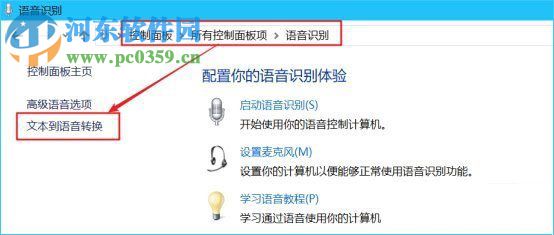
这样就可以使用微软小娜朗读小说了。
3、下面小编给大家分享一段可以让PowerShell阅读小说的代码。将其复制粘贴并保存为.psl文档。使用鼠标右键单击选择“打开方式”-“PowerShell运行”。系统会弹出如下图所示窗口,将小说文本拽入窗口,按下回车键之后你就能听见小娜的声音了,再次按下回车键就可以退出了。
= Read-Host -Prompt '把小说拖到此处并回车开始朗读'
= New-Object -ComObject SAPI.SpVoice
.Speak(,5)
Read-Host -Prompt '回车退出朗读'
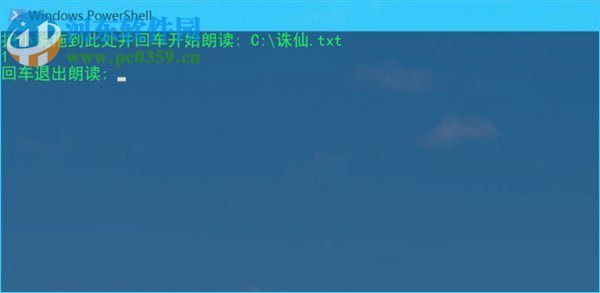
使用以上方法就可以在Win10中让小娜为您读书了,感兴趣的用户可以根据小编的步骤自己设置一下喔!
相关文章:
 网公网安备
网公网安备